
AI MIDI on Mac.
Notes you can edit.
SL Generate is an AI MIDI generator for Apple Silicon Mac. Create a melody, chord phrase, bassline, arpeggio or drum pattern, change its notes, then move MIDI or rendered WAV into your music project.
Written by Sfoor Labs, the maker of SL Generate. Product facts checked October 14, 2026. This is a workflow guide, not an independent review or a claim that every DAW has been tested.
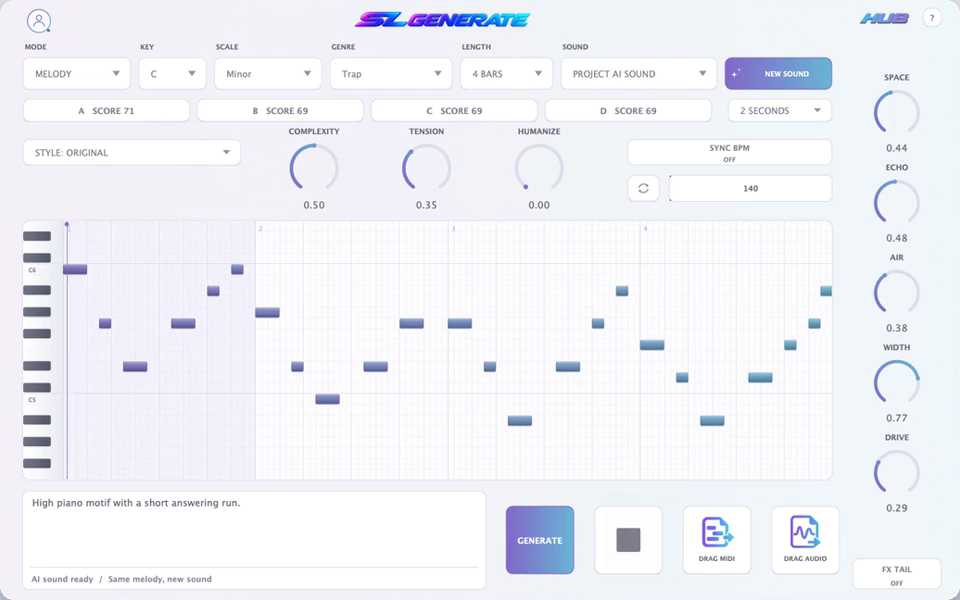 Watch the real SL Generate demo
Build an idea you can change
Choose the musical role: Melody, Chords, Bass, Arpeggio or Drums. Start with one part rather than expecting a finished track.
Set a genre, key, scale and length. Available phrase lengths are 1, 2, 4 or 8 bars. When working in a host, check the project tempo and the plugin's DAW tempo-sync setting.
Generate and audition the phrase. A contains the AI phrase; B, C and D provide derived alternatives. These are not four separately generated songs.
Edit the notes in the piano roll. Adjust the phrase before deciding which sound will play it. A shorter or simpler part can leave room for the rest of your arrangement.
Choose a factory sound or another available sound. Optional New Sound creates a cloud instrument and uses a separate allowance; it is not required to change the MIDI notes.
Drag MIDI or rendered WAV into your DAW. Keep the MIDI if you want to change notes or play the part through another instrument. Choose WAV when you want the rendered sound as audio.
Exporting a phrase does not arrange, mix or master a complete song. Listen in the context of your project and keep the parts that serve it.
MIDI or WAV?
| You want to | Start with | What stays editable |
|---|---|---|
| Change the notes or the instrument | MIDI | The musical note events. Choose and configure the receiving instrument in your DAW. |
| Keep the generated sound as an audio part | Rendered WAV | The audio clip and its processing. It is not a separate editable MIDI performance. |
Import and drag-and-drop behaviour depends on the host and destination track. Follow your DAW's current documentation; a successful file export is not proof of every host workflow.
For FL Studio, Image-Line documents MIDI import in the Piano roll menu and audio import in the Playlist guide. These vendor instructions do not certify an independently tested SL Generate host matrix.
Choose access for the job
If you only want the generator, SL Generate is $4.99 billed monthly or $47.88 billed yearly, equivalent to $3.99 per month. If you also want the SL plugin catalogue, Ultimate includes Generate at $12.99 billed monthly or $131.88 billed yearly, equivalent to $10.99 per month.
The paid allowance is 150 MIDI generations and 25 New Sound operations per month. Ultimate does not increase that allowance. The separate Generate plan offers a three-day trial with 20 MIDI generations and 20 New Sound operations total; a payment method is required and the selected plan renews unless canceled. Ultimate has no trial.
Mac subscriptions and App Store purchases are separate. Free SL effects do not require a paid plan. Check current billing and renewal options before choosing.
Compare current plans and billingBefore you install
Does SL Generate work on Windows or an Intel Mac?
This release is for Apple Silicon Mac with macOS 13 or later. Standalone, VST3 and Audio Unit are included. Windows, Intel and mobile availability are not included in this release.
Can I use it offline?
No. Generation, license checks, preview and export require active online access. Do not choose it for an offline-only workflow.
How do I install and update it?
Connect your Sfoor Labs account in SL Hub for Mac. Install SL Generate there and use Check updates when the plugin and DAW are closed.
What if I only need effects for existing audio?
Start with the five free Mac effects: Drift, Space, Radio Mini, Clean and Bass Boost. They process audio; they do not generate a MIDI melody.
Sources and limits
Checked October 14, 2026: SL Generate product facts and demo, subscription terms, SL Hub and the linked host documentation. No latency benchmark, new host certification, competitor trial or customer purchase was performed for this guide. The screenshot shows the real product; no interface or processed sound was simulated.